The result
Every result is checked before you see it: all quads, no holes, nothing turned inside out, no pinched quads, the same pieces and openings as your mesh, and about the number of quads you asked for.
A clean result
The card shows one line, <quads> quads in <name>_quadmesh, and the verdict bottom
left of the viewport says clean. The result is yours; remesh again any time, the new
one replaces it.
A few quads may need a touch-up
Sometimes a handful of quads come out pinched or folded, usually where a part is thinner than a quad: an ear's rim, a fingertip. The engine has already tried to fix them itself (see Retry Until Clean); when a few are left, the card says so in one line:
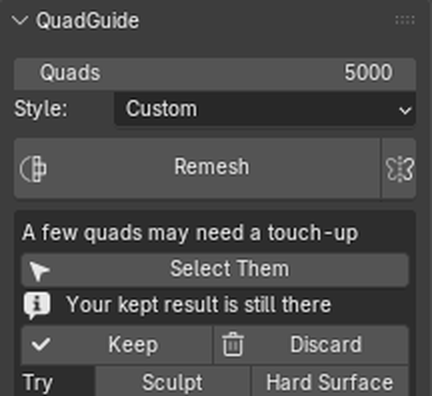
Select Them selects those quads in Edit Mode and frames them. Smooth Vertices or the Relax brush fixes them in seconds. If it keeps happening on the same part, raise Quads a little, or paint that part Denser and Remesh.
Came out torn
When the check finds more than a few pinched quads (a hole, a piece come apart), the card says This one came out torn in places. That is not for you to repair: press another style under Try, or raise Quads and Remesh. Very dense scans (millions of faces) are the usual case today; see the roadmap.
Kept result and candidate
If you already had a result and the new one has problems, the new one arrives as
<name>_quadmesh_candidate and your earlier result stays as it was (hidden). Keep makes
the candidate your result; Discard deletes it and shows your earlier result again.
A first result with only a few pinched quads is simply your result.
Retry Until Clean
Before you see a problem, the engine tries to fix it itself (Expert setting Retry Until Clean, on by default): it refills the bad spots, then tries a close variant such as 1 % more quads. When one passes, the card says which, for example checked: clean with 1530 quads. Use that count next time.
Try another style
When a result needs fixing, Try offers the other styles: one click remeshes with that style and keeps both results to compare with Show Original / Show Result.
Review
With Expert Settings on (Edit > Preferences > Add-ons > QuadGuide), a Review section under the result lists what to check before you keep it:
| Line | What to look for |
|---|---|
| Quads | Against the count you asked. |
| Poles | Vertices where 3, 5, or 6 or more edges meet. 6+ is flagged: worth a look. |
| Size | The spread of quad sizes against the size asked. |
| Not quads | Should be 0. |
| Open edges | Your mesh's own openings, and any hole the remesh made. |
To see poles and quad sizes on the mesh, turn on Show: Poles and Show: Density under Options.
Save Report
The small export icon next to the result line saves a zip with the last run's log and settings, to send with a bug report. Your mesh is only included when you ask for it.